
Download Peach App – Free AI‑Powered Slide Generator for Windows, Mac, Android & iOS
Overview: How Peach App Is Revolutionizing Slide Creation
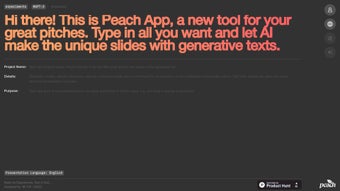
Peach App is a browser‑based, AI‑driven slide generation tool that turns a short text description into a full‑featured presentation deck in seconds. Launched in 2023 by the Self_ project, the service focuses on English‑language content and delivers modern, design‑ready slides without requiring any design expertise. Because the engine runs entirely in the cloud, users only need a stable internet connection and a modern browser with JavaScript enabled. The platform automatically creates slide titles, bullet points, speaker notes, and visual layouts that follow a consistent style guide, dramatically cutting down the time spent on manual formatting. Early adopters have praised Peach App for its speed, ease of use, and the professional look of its templates. While the free tier limits users to five slides per month and the tool currently supports only English, the seamless, secure workflow makes it an attractive option for startups, marketers, educators, and anyone who needs polished presentations quickly. In addition to the core generation capabilities, Peach App offers one‑click export to PowerPoint (.pptx) or PDF, ensuring that the final product can be edited offline or shared directly with stakeholders. Overall, the service blends AI convenience with a no‑install, cross‑platform experience, positioning itself as a compelling alternative to traditional presentation software.
Key Features & Benefits That Set Peach App Apart
- AI‑Generated Content: Input a brief description and receive automatically crafted slide headings, concise bullet points, and speaker notes.
- Professional Templates: Choose from a library of modern, responsive templates that adapt colors, fonts, and icons to match the generated content.
- One‑Click Export: Download decks as PowerPoint (.pptx) or PDF files, ready for Windows, macOS, Android, or iOS devices.
- Web‑Based Access: No software installation required; the tool works in Chrome, Edge, Safari, and Firefox.
- Secure Cloud Processing: All data is transmitted over HTTPS and processed on encrypted servers, complying with GDPR standards.
- Free Starter Plan: Generate up to five slides each month at no cost, with optional paid upgrades for unlimited usage.
- Continuous Updates: The AI model is refreshed automatically, delivering the latest improvements without user intervention.
These features translate into tangible benefits for a wide range of users. Entrepreneurs can build investor‑ready decks in minutes, freeing up time to focus on product development. Marketing teams gain a fast, consistent way to produce client presentations that align with brand guidelines. Educators and students receive clean, well‑structured lecture slides that emphasize key concepts without the overhead of manual design. Because Peach App operates entirely in the browser, it is equally accessible on desktops, laptops, tablets, and smartphones, making collaboration across mixed‑device teams effortless. The secure, cloud‑first architecture also ensures that sensitive business information never resides on local machines, reducing the risk of data leaks.
Step‑by‑Step Installation, Compatibility Details, and Usage Guide
1. Open the Service in Your Browser
Visit the official Peach App URL using any up‑to‑date web browser (Chrome, Edge, Safari, or Firefox). Ensure that JavaScript is enabled; the platform will not load without it. Because the application runs in the browser, there is no download or installer required, and the experience is identical on all supported operating systems.
2. Create an Account (Optional but Recommended)
While anonymous usage is possible, registering with an email address unlocks the free starter plan, saves your projects to the cloud, and allows you to resume work later. The sign‑up process is short, secured with HTTPS, and complies with GDPR, meaning your personal data is handled responsibly.
3. Provide Your Pitch or Topic
In the dashboard, you’ll find a text box labeled “Enter your pitch description.” Type a concise paragraph (2‑3 sentences) that outlines the purpose of your presentation. The AI parses this input to determine slide hierarchy, key messages, and appropriate visual styles.
4. Select a Template and Review the Draft
Within ten seconds, the system generates a preview deck. Use the “Template” dropdown to switch among options such as “Minimalist,” “Tech Startup,” or “Corporate.” Each template automatically adjusts colors, typography, and iconography to maintain visual harmony with the AI‑generated content.
5. Export Your Deck
When satisfied, click the “Download” button. Choose either PowerPoint (.pptx) for further editing or PDF for immediate sharing. The file is produced instantly on the server and delivered to your device, ready for offline use or presentation.
Compatibility & System Requirements
Peach App is compatible with any operating system that can run a modern web browser, including Windows 10/11, macOS 12+, Linux distributions, Android 9+ and iOS 14+. Because the service is cloud‑based, there are no platform‑specific binaries or hardware constraints, making it ideal for teams that operate across diverse environments.
Pros & Cons, Frequently Asked Questions, and Final Verdict
Pros
- Rapid AI‑driven slide creation saves hours of manual work.
- High‑quality, ready‑to‑present designs require no design background.
- Free starter tier makes the tool accessible to individuals and small teams.
- Cross‑platform browser support works on Windows, macOS, Linux, Android, and iOS.
- Secure, GDPR‑compliant cloud processing protects user data.
- Automatic updates ensure you always use the latest AI model.
Cons
- Requires JavaScript; users with disabled scripts cannot access the service.
- English‑only support limits non‑English speakers.
- Limited post‑generation customization may frustrate power users.
- Free plan caps slide generation at five slides per month.
- No offline desktop application; internet connectivity is mandatory.
Peach App delivers an impressive blend of speed, design quality, and ease of use. While the lack of deep customization and multilingual support are notable gaps, the free tier and browser‑based workflow make it an excellent first‑stop solution for anyone needing quick, professional slides.
Frequently Asked Questions
Is Peach App really free to use?
Yes. The free starter plan lets you generate up to five slides per month at no cost. Unlimited slide creation is available through a paid subscription.
Do I need to install any software?
No installation is required. Peach App runs entirely in your web browser, provided JavaScript is enabled.
Can I use Peach App on mobile devices?
Absolutely. The platform is fully responsive and works on Android and iOS browsers, allowing you to create and download slides from smartphones or tablets.
What languages does Peach App support?
Currently, Peach App supports English for both input and generated slide content.
How secure is my data when I use the service?
All data is transmitted over HTTPS and processed on encrypted servers. Peach App adheres to GDPR standards, ensuring that your information remains private and secure.
Conclusion & Call to Action
If you need a fast, reliable way to turn a rough idea into a polished presentation, Peach App is a top‑tier choice. Its AI engine, modern templates, and zero‑install workflow let you focus on storytelling rather than design. Download Peach App today, start with the free plan, and experience how effortless slide creation can be. Upgrade anytime for unlimited slides and unlock the full power of AI‑driven presentations.



.png)



